
Health Diary by MedM
MedM IncMedical
4.7291.00 Reviews
- Version
- 3.11.3
- Installs
- 100.00K
- Age Rating
- Everyone
Screenshots
Our Review of Health Diary by MedM
 Analysis by Appyee
I tend to judge a health log less by how many things it can record and more by whether I’ll still be using it after the first week. Health Diary by MedM is built for people who want several kinds of personal and family health information kept together, rather than scattered across notes, paper charts, and separate apps. That broader purpose is useful, but it also means the app works best when you have a clear routine for what you want to track.
What to expect from its pace
For everyday use, I’d approach this as a record-keeping tool, not a live health monitor. Its job is to help you enter readings, review them, and build a history you can refer to later. A quick manual entry should feel like a small task; the more meaningful time investment is deciding which measures matter and setting up a consistent habit around them.
The app is free to download, with optional in-app purchases ranging from $5.99 to $99.99 per item. That makes it reasonable to try the basic experience before deciding whether you need anything beyond it. I would not assume that every tool or service is included at no cost, so it’s worth checking the purchase details in the app before building a routine around a feature.
When the log gets busy
The most demanding period is likely to be the beginning, especially if you’re bringing together information for more than one person. A family member may have a long history of readings, while another only needs occasional weight or temperature entries. Adding everything at once can turn a simple diary into a project, so I’d start with the measurements you actually plan to discuss or compare.
A practical approach is to create a short list before opening the app: who will use it, which readings each person needs, and how often they are likely to take them. That small bit of planning helps avoid filling profiles with details that won’t be maintained. If you’re recording blood pressure, for example, consistency in when and how you take a reading is more useful than a large number of entries made irregularly.
Reliability means a usable record
For a health diary, reliability is not just whether an app opens quickly. It also means being able to understand which person a reading belongs to and to find a useful history later. Health Diary’s family profiles are valuable for that reason, though they call for care: when entering information in a shared household routine, check the active profile before saving. A correct measurement attached to the wrong person can be more confusing than no entry at all.
I’d also treat any app-generated chart or report as an aid to conversation, not a diagnosis. The record can help you explain what has been happening between appointments, but a clinician should interpret concerning changes in context. Keep the original measurement device and any medical instructions as your reference; the diary is there to organize the information, not replace professional care.
Fit, limits, and a fair comparison
Health Diary is a medical app from MedM Inc. It has a 4.1 average from around 3,700 ratings, and more than 100,000 installs. It is rated for Everyone, and the current version is 3.9.1513, with Android 5.0 as the minimum operating system. It was released on May 18, 2014, so it has a long history as a health-record option, although an older release date alone does not tell you how it will behave on your particular device.
Compared with using a phone’s general notes app, a dedicated health log gives your readings a more purposeful home and makes it easier to review patterns. Compared with a single-purpose blood-pressure or glucose tracker, its appeal is breadth: several kinds of measurements and family records can sit in one place. The trade-off is that a broad tool may feel like more setup than you need if you only want to record one number now and then.
I would choose it if I wanted a shared household record, or if I needed to bring several measurements to a medical appointment without sorting through loose notes. I’d skip it in favor of a simpler tracker if I only wanted one kind of reading and had no interest in maintaining profiles or a wider health history. If you’re looking for treatment advice or a substitute for a clinician, this is not the right kind of app.
One useful habit is to keep entries focused on the question you’re trying to answer. If you want to see whether a change in routine coincides with different readings, record the relevant measure regularly and add only context you can realistically maintain. A diary becomes less useful when every entry turns into a long report that you eventually stop making. Start small, then expand only when a real need appears.
Getting Started with Health Diary
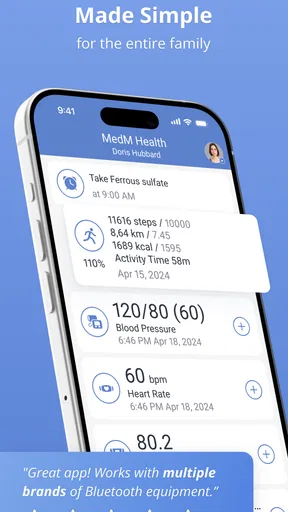
First things first, setting up Health Diary by MedM is a breeze. You download the app, and after a quick sign-up, you're good to go. The interface is clean and intuitive, which is a huge plus. No one wants to navigate through a labyrinth of menus when they're just trying to log their blood pressure or weight.
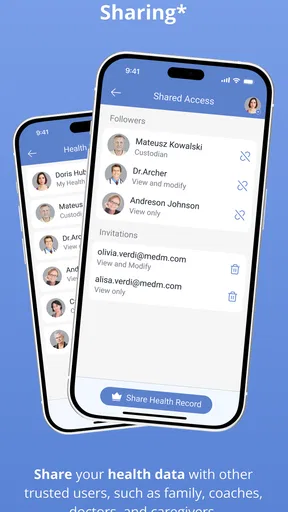
Once you're in, the app prompts you to set up profiles. This is particularly handy if you're keeping tabs on multiple family members. Just add their info, and you can switch between profiles with a simple tap. It's like having a personal health assistant for each family member right in your pocket.
Features that Stand Out
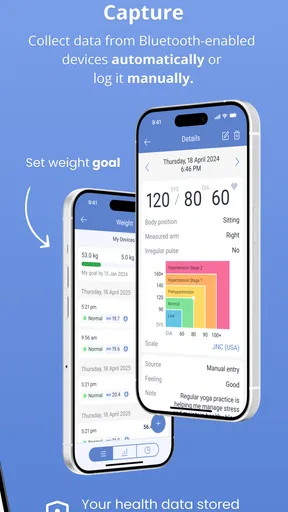
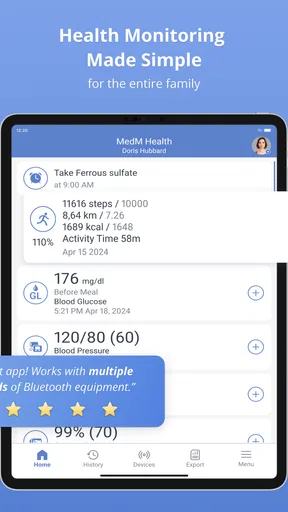
What caught my eye the most are the extensive tracking options. From blood pressure and glucose levels to weight and medication reminders, this app covers it all. You can log pretty much everything that might affect your health, which is fantastic for those of us who like to keep an eye on the details.
Another feature that's worth mentioning is the data visualization. The app transforms your raw data into easy-to-read graphs and charts. I mean, who doesn't love a good chart? It's a fantastic way to spot trends and patterns over time, helping you and your doctor make informed decisions.
Integration and Accessibility
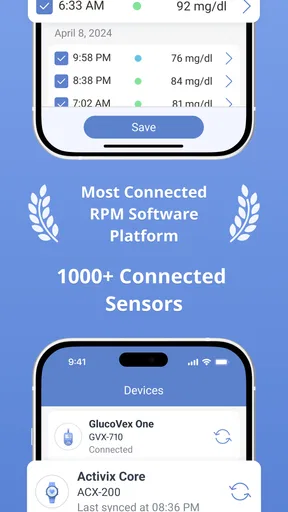
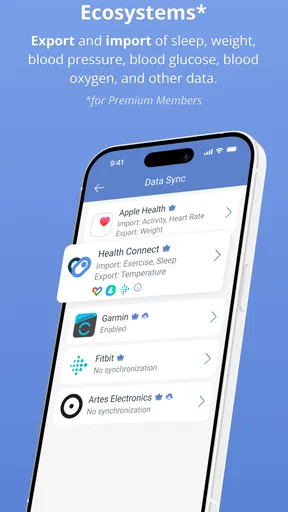
Now, you might be wondering, "How does this app fit in with the rest of my digital health gear?" Well, it syncs seamlessly with various health devices. Got a smart scale or a blood glucose monitor? You can connect them to the app and have your readings automatically logged in. This integration is a game-changer, making the whole process of health tracking as effortless as possible.
Plus, the app supports multiple languages, making it accessible to a wide range of users globally. It’s these little touches that show the developers have really thought about making the app inclusive and user-friendly.
Keeping You on Track
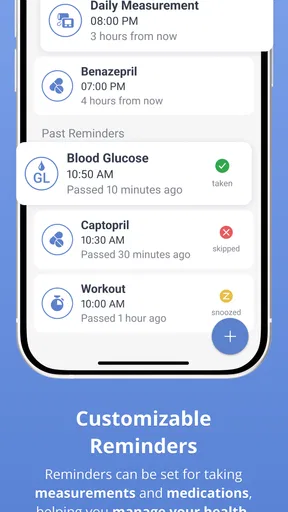
Let's talk about reminders. If you're anything like me, remembering to take medications or log your stats can be a bit of a challenge. Health Diary has this covered with customizable reminders. You can set them up to nudge you at just the right times, ensuring nothing slips through the cracks.
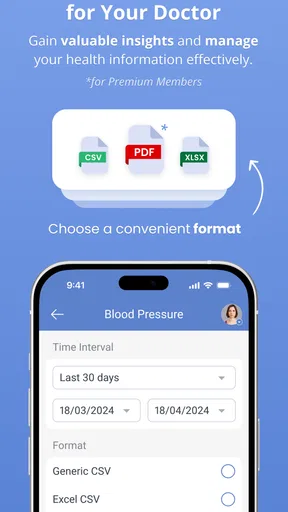
The app also provides detailed reports that you can share with your healthcare provider. This is super handy for those regular check-ups, giving your doc a clear view of how you've been doing between visits.
Room for Improvement?
While Health Diary by MedM is pretty solid, there's always room for a little improvement. One thing I noticed was that the initial data entry can be a bit time-consuming, especially if you're starting from scratch. However, once you get past that initial setup, maintaining your logs is a breeze.
Another potential downside is that some users might find the sheer number of features a bit overwhelming at first. A more guided tutorial could help new users get the hang of everything quicker. That said, the learning curve isn’t too steep, and once you’re familiar with the app, it’s smooth sailing.
Keeping a routine realistic
For a routine that involves several family members, I’d avoid trying to turn every health detail into a daily task. Pick a small set of measurements for each profile, and use reminders only for actions that genuinely need prompting. Too many alerts can become background noise; a reminder is helpful when it supports a specific habit, not when it adds another notification to ignore.
There’s also a practical difference between automatic and manual records. Connecting a compatible device can reduce repeated typing, while manual entry gives you flexibility when a reading comes from equipment that isn’t connected. Either way, I’d review a new entry after recording it, especially when switching between profiles or entering values in a hurry. A quick check is a useful safeguard against a misplaced or mistyped reading.
A realistic appointment-day workflow
Imagine you have a routine appointment coming up and have been keeping track of blood pressure and weight at home. Rather than trying to remember several readings in the waiting room, you can use the diary’s history and reports to prepare a concise account of what you have recorded. I’d decide beforehand what period or concern I want to discuss, then focus on those entries instead of scrolling through every measurement in the app.
If a reading seems unusual, the sensible next step is not to rely on a graph alone. Check the measurement using the device’s instructions, note the circumstances if they matter, and follow your clinician’s guidance about when to seek help. The value of the diary is that it can make a pattern easier to explain; it cannot tell you what that pattern means medically.
Questions worth settling before relying on it
If you’re wondering whether it can cover more than one person, family profiles are one of its clearest strengths. If you’re asking whether every reading has to be typed manually, the app can connect with health devices, though the useful choice depends on whether your own equipment is compatible. For a person who tracks only occasionally, manual entry may be perfectly manageable; for frequent measurements, device connection can reduce the chore of repeated input.
Another common concern is whether the information can help at a check-up. The app’s reports are designed to be shared with a healthcare provider, which can make a conversation more organized. I’d still keep expectations grounded: a report is a record to discuss, not a diagnosis or a recommendation to change treatment. And if your main question is whether it will run well on your phone, the stated Android minimum is 5.0, but your experience can still depend on your device and software environment.
Who benefits most from its breadth
The strongest case for Health Diary is someone who has several useful measurements to follow, or a household that wants to keep different people’s records organized without relying on a pile of notebooks. It also suits people who like looking back at trends and prefer to prepare information before speaking with a clinician. Those benefits depend on regular use; a comprehensive log has little value if the setup feels too ambitious to maintain.
By contrast, someone who wants a single reminder or a basic one-number log may find a focused app easier to learn and quicker to maintain. Likewise, if you expect an app to interpret results, make care decisions, or replace advice from a medical professional, this is the wrong tool for that job. Its breadth is useful when you have a real reason to bring different records together, not simply because more tracking is always better.
Final Thoughts
All in all, if you're serious about keeping your health data organized and accessible, Health Diary by MedM is definitely worth checking out. It's packed with features designed to make health tracking as painless as possible. The app's ability to integrate with other devices and its user-friendly design makes it a standout choice in the world of health management apps.
Whether you're managing a chronic condition or just want to keep a closer eye on your well-being, this app has got you covered. So, give it a whirl and see how it fits into your daily routine. You might just find it becomes an essential part of your health toolkit.
My main caveat is the same one I apply to any detailed health diary: the best system is the one you can keep using without turning care into data entry. Begin with a few readings, make sure each family profile is clearly identified, and add more only when it helps answer a practical question. That keeps the useful parts—an organized history, charts, reminders, and shareable reports—in reach without asking the app to do more than it should.
Performance verdict
For speed and stability, I’d set expectations around a straightforward logging app rather than a demanding real-time service. The day-to-day work is recording and reviewing health information, so the more noticeable friction is likely to be setup and keeping entries consistent, not elaborate processing. I can’t infer battery use or recovery behavior from the app’s purpose alone, and those can differ across phones. In practical terms, Health Diary’s value comes from turning a small, repeatable habit into a record you can use later; if you keep that habit modest, its broad toolkit is easier to manage and more likely to remain useful.
Verdict
Strengths of Health Diary by MedM
- User-friendly interface with intuitive navigation.
- Supports multiple health metrics tracking.
- Cloud backup ensures data safety and accessibility.
- Customizable reminders for medication and appointments.
- Compatible with a wide range of medical devices.
Limitations of Health Diary by MedM
- Limited offline functionality may hinder access.
- No integration with some popular fitness apps.
- Ads present in the free version can be distracting.
- Premium features require a subscription.
- Occasional sync issues with certain devices.
Other Releases by MedM Inc
View All
Blood Pressure Diary by MedM
Medical4.4
Similar Picks in This Category
View All
WebMD: Symptom Checker
WebMD, LLC4.1

Microphone Amplifier
DOSA Apps4.2

Anatomy Learning - 3D Anatomy
3D Medical OU4.5

Period Tracker and Calendar
SimpleInnovation4.9

GoodRx: Prescription Coupons
GoodRx4.8

CVS Health
CVS Pharmacy4.5
Frequently Asked Questions
What is the primary function of Health Diary by MedM?
Health Diary by MedM is designed to help users track and manage their health data effectively. It allows you to log various health metrics like blood pressure, glucose levels, weight, and more. The app supports data synchronization with various devices, providing a comprehensive view of your health trends over time.
Is Health Diary by MedM compatible with my device?
Health Diary by MedM is available for both Android and iOS devices. It supports a wide range of smartphones and tablets. Ensure your device's operating system is up to date to avoid any compatibility issues. You can find the app on Google Play Store for Android and the App Store for iOS users.
Does the app allow data synchronization with other health devices?
Yes, Health Diary by MedM supports synchronization with numerous health devices. The app is compatible with devices such as blood pressure monitors, glucose meters, and weight scales. This feature allows seamless data integration, enabling users to maintain an accurate and up-to-date health record.
Are there any privacy concerns with using Health Diary by MedM?
Health Diary by MedM prioritizes user privacy and data security. The app employs encryption protocols to protect your health data. Users have control over their data, and the app complies with relevant data protection regulations. It is advisable to review the app's privacy policy for detailed information.
Is there a cost associated with using Health Diary by MedM?
Health Diary by MedM offers a free version with basic features. For advanced functionalities, such as additional data tracking and enhanced analytics, there may be in-app purchases or subscription options. Users should evaluate their needs to decide if the premium features are worth the investment.
